
Let’s be honest: asking for reviews can feel awkward.
But in Knoxville (and everywhere else), Google reviews are one of the strongest “prominence” signals for the Map Pack—and they’re also one of the biggest conversion drivers when a potential customer is comparing you to two other businesses.
The good news: you don’t need to beg. You just need a simple, repeatable system that makes it easy for happy customers to leave feedback at the right moment.
In this post, you’ll get:
A proven “review flywheel” system
Copy/paste templates (text + email + in-person scripts)
What to do about negative reviews
How to respond to reviews for better conversions (and better local SEO)

Why Google Reviews Matter for Knoxville Local SEO
When someone searches “near me” or “Knoxville + service,” Google is trying to show the most trusted options. Reviews help Google understand:
Are real people choosing you?
Are they happy with the experience?
Are you active and responsive?
Do you consistently deliver results?
Reviews also impact the human side:
More reviews + strong rating = more clicks
More clicks = more calls
More calls = more revenue
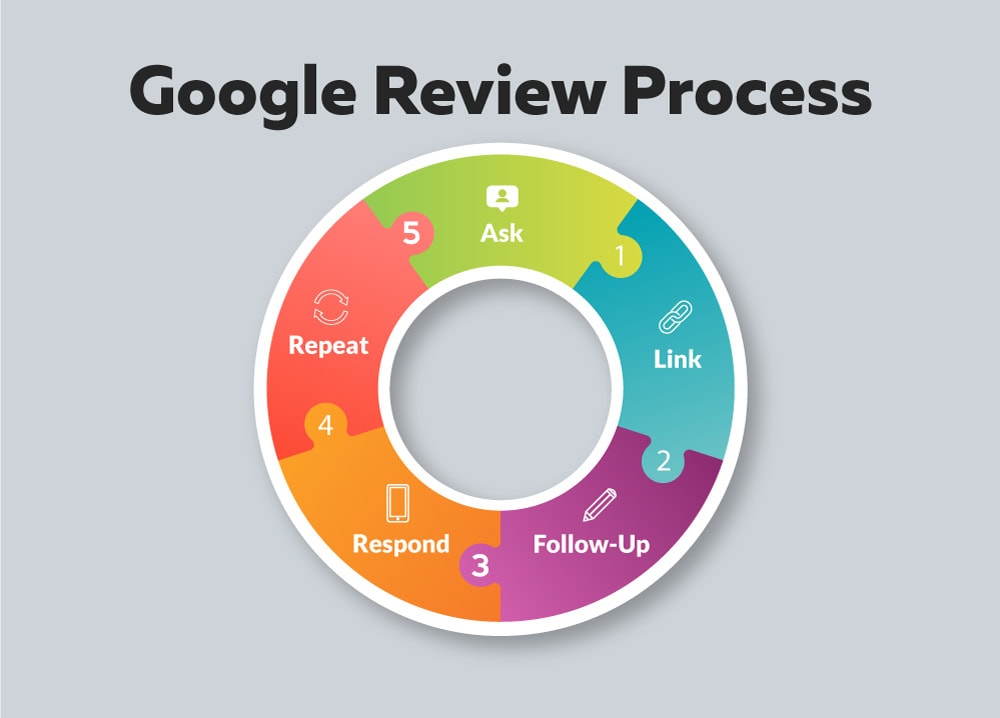
The Knoxville Review Flywheel (Simple System That Works)
If you do nothing else, do this:
Ask every happy customer
Ask fast (24–72 hours after the win)
Use one simple link
Follow up once
Respond to every review
That’s it. Consistency beats everything.
What “good consistency” looks like
A few reviews every week is better than 20 in one day and nothing for two months
In competitive categories, aim for 4–8 new reviews per month as a baseline (more if you’re actively growing)
Step 1: Make It Ridiculously Easy
Create one “Review Link”
In your Google Business Profile, grab your review link and save it somewhere you can access instantly:
Notes app
CRM template
Email signature snippet
A short link (optional)
Pro tip: Create a “Review Request” saved reply on your phone so you can send it in 10 seconds.
Step 2: Ask at the Right Moment (Timing Matters)
Don’t ask when the job starts. Ask when the customer feels the win.
Best moments:
Immediately after a successful project delivery
Right after you solve an urgent problem
After a compliment (“This looks great!”)
After a milestone (launch day, ranking improvement, install completion)
Avoid:
Asking before results
Asking weeks later when the excitement is gone
Step 3: Use These Copy/Paste Templates (High-Converting)
Text Message Template (best overall)
Hey [Name] — quick favor 🙏 If you were happy with our work, would you leave us a Google review? It helps other Knoxville customers find a trusted [service]. Here’s the link: [REVIEW LINK]
Thank you! — [Your Name]
Short Text Template (for busy customers)
Thanks again, [Name]! If you can, would you leave us a Google review? [LINK]
Email Template (professional)
Subject: Quick favor? (30 seconds)
Hi [Name],
Thanks again for choosing us. If you were happy with the experience, would you mind leaving a Google review? It helps other Knoxville-area customers find a trusted provider.
Leave a review here: [REVIEW LINK]
Appreciate you,
[Signature]
In-Person Script (non-awkward)
“If you feel good about the results, would you mind leaving us a quick Google review? It helps us a lot locally.”
Step 4: Follow Up Once (Without Being Annoying)
Most people intend to leave a review and forget. A single follow-up usually doubles your results.
Follow-Up Text (48 hours later)
Hey [Name] — just following up. If you still have a moment for that Google review, here’s the link again: [LINK]
Either way, thanks again!
Rule: Only follow up once. Keep it polite and short.
Step 5: How to Respond to Google Reviews (So They Convert Better)
Responding to reviews does two things:
Shows potential customers you’re active and professional
Reinforces what you’re known for (services + quality)
Response Formula
Thank them + mention what you helped with + invite them back
Example (5-star):
Thanks so much, [Name]! We loved helping you with [service]. Really appreciate you choosing us here in Knoxville—if you ever need anything else, we’ve got you.
How to respond without sounding spammy
Don’t cram “Knoxville TN” into every reply
Use natural language and specifics
Rotate phrasing so responses don’t look copy/pasted
What About Negative Google Reviews?
Negative reviews happen—even to great businesses. The goal is not perfection; it’s professionalism.
4-Step Response Framework
Acknowledge their experience
Apologize (without admitting something you didn’t do)
Offer a solution
Move it offline (phone/email)
Example response:
Hi [Name] — I’m sorry to hear you had a frustrating experience. That’s not the standard we aim for. Please contact me directly at [phone/email] so I can understand what happened and make it right.
Do not:
Argue publicly
Post emotional replies
Accuse them of lying (even if they are)
“Review Velocity” Beats “Review Count”
If two Knoxville businesses have similar ratings, the one getting fresh reviews consistently often wins.
Simple goals:
Minimum: 2–4 new reviews per month
Better: 4–8 new reviews per month
Aggressive growth: 8–15 per month (if volume supports it)
Bonus: The Two Best “Ethical” Ways to Increase Reviews Faster
1) Ask at the end of every workflow
Make reviews part of your process:
Final invoice email includes the review request
Completion text includes the link
“Thank you” page includes the review link
2) Trigger the ask after praise
Whenever a customer says:
“This looks awesome”
“Thanks for the quick help”
“We love it”
That’s your cue to send the request immediately.
Mini Checklist: Reviews That Drive Map Pack Rankings
One review link saved and ready
Ask every happy customer within 72 hours
One follow-up 48 hours later
Respond to every review
Keep review velocity steady monthly
Need Help With SEO and Google Reviews
If you want, we can build your review system and GBP strategy so it runs consistently and supports rankings in Google Maps.
Request a Free Local SEO Audit
Talk to G Squared Studios about Knoxville SEO + Web Design